Apple Sleep Score vs AutoSleep: what each one grades
Updated November 2, 2026 · 7 min read · How we write these
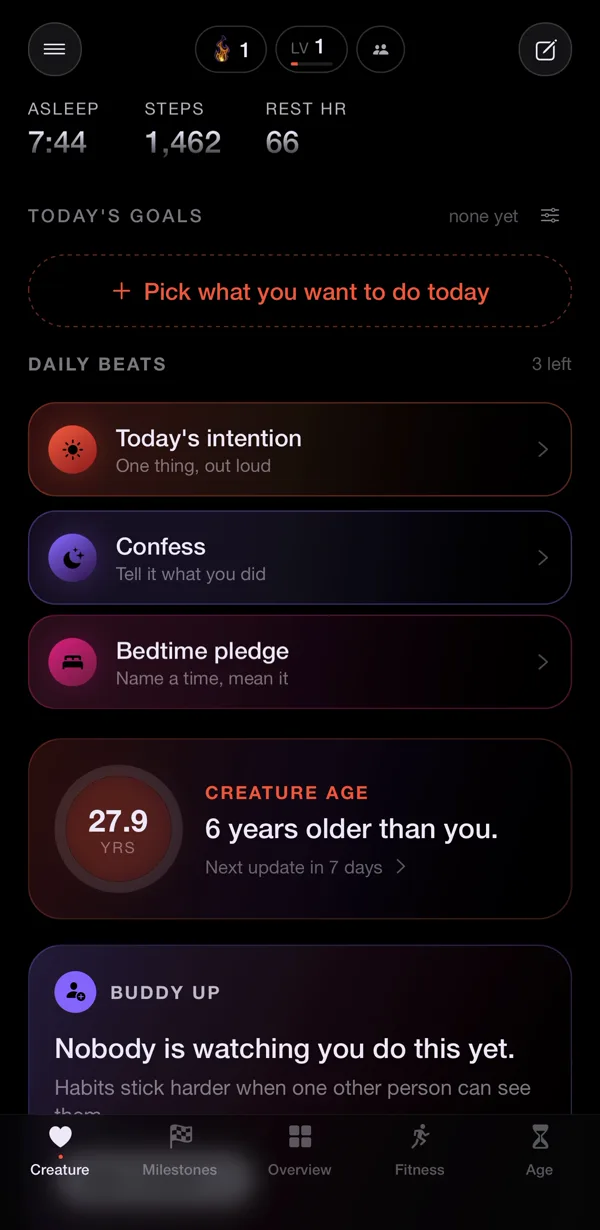
 Nularo reads your Apple Health and turns it into a creature that reacts to how you really slept and moved.
Get it
Short answer
Apple's Sleep Score is free with watchOS 26: 0 to 100 from duration (50 points), bedtime consistency over the last 13 nights (30) and interruptions (20). See it in the watch's Sleep app or in Health, Browse, Sleep. AutoSleep ($9.99 once, no subscription) builds its Sleep Rating from four rings (sleep, quality, deep sleep, heart rate dip) measured against goals you set, and it can pass 100%. Apple suits a set-and-forget grade; AutoSleep suits tinkerers who want heart rate in the score. Pick one to trend.
You paid for AutoSleep years ago, back when the Apple Watch could barely tell you were asleep. Now the watch grades every night out of 100 on its own, and the two numbers rarely match. So which grade is right, and do you still need the app? Short version: they are grading different tests.
What Apple's Sleep Score grades
Since watchOS 26, Apple Watch gives each night a Sleep Score from 0 to 100. Apple's support page lists exactly three parts:
- Duration, 50 points. How long the watch estimates you slept.
- Bedtime consistency, 30 points. How close the time you fell asleep was to your last 13 nights.
- Interruptions, 20 points. How often you woke and how long you stayed awake.
The number lands in a band: Very Low (0 to 40), Low (41 to 60), OK (61 to 80), High (81 to 95) or Very High (96 and above). It needs watchOS 26 on an Apple Watch Series 6 or later, SE (2nd generation) or later, or any Ultra, paired with an iPhone 11 or later on iOS 26. Track Sleep with Apple Watch has to be on, and you need to wear the watch for at least an hour. Apple suggests charging to at least 30% before bed, because a watch that dies overnight records nothing.
To see it, open the Sleep app on the watch in the morning and tap the Info button for the breakdown. On iPhone, open Health, tap Browse, then Sleep.
Note what is missing. Sleep stages are not one of the three parts, so a night with plenty of deep sleep earns no bonus. Heart rate is not in there either. The stages still show in Health, and our guide to reading the Apple Watch sleep graph covers what they mean and how far to trust them.
What AutoSleep's Sleep Rating grades
AutoSleep, from the developer Tantsissa, is the long-running paid Apple Watch sleep tracker. Its App Store listing puts it at $9.99 with no subscriptions. Its rating works on a different idea: not "how did this night score on a fixed scale" but "how close did you get to your goals."
The developer's documentation describes four rings that combine into the Sleep Rating on the Today tab:
- Sleep. Time asleep against your required sleep, which defaults to 8 hours.
- Quality. Built from duration, restlessness and heart rate, with movement the main driver.
- Deep sleep. AutoSleep's own measure, counted only when a dip in heart rate and very little movement happen together. The developer says to compare it with your own history.
- Heart rate dip. Your average sleeping heart rate against your resting daytime average.
The developer calls a ring at 75% or above good and 100% very good, and the rating can go past 100% after a long or high-quality night. There are also heart profiles (Normal, Athlete and High), where High drops the heart rate dip requirement for people whose heart rate does not dip at night.
The catch is the same as the strength: you set the goals. Lower your required sleep from 8 hours to 7 and your rating goes up for exactly the same night. That makes AutoSleep great for tracking yourself against a target you chose, and useless for comparing with anyone else.
Apple Sleep Score vs AutoSleep, side by side
| Apple Sleep Score | AutoSleep Sleep Rating | |
|---|---|---|
| Scale | 0 to 100, five bands | A percentage that can pass 100 |
| Built from | Duration, bedtime consistency, interruptions | Sleep, quality, deep sleep and heart rate dip rings |
| Fixed or personal | Fixed weights; consistency compares you with your last 13 nights | Measured against goals you set |
| Heart rate in the score | No | Yes |
| Bedtime consistency in the score | Yes, 30 points | No (shown as a separate Sleep Consistency figure) |
| Without the watch on | No data, no score | Can still log time in bed from when you put the watch down and pick up the iPhone |
| Extras | Sleep stages in Health, sleep apnea notifications on supported models | Readiness rating, Lights Off, a sleep apnea gauge, a companion snoring app (AutoSnore) |
| Price (US) | Built in | $9.99 once, no subscription |
The biggest practical difference is consistency. Apple gives a third of its points to falling asleep at a steady time, and AutoSleep's rating does not care when you went to bed. AutoSleep does show a separate Sleep Consistency figure on its Today tab, but it is not one of the four rings. A night owl with long, calm nights will look better in AutoSleep than in Apple. If bedtime regularity is what you want to fix, see sleep consistency apps for how different apps measure it.
Why the two disagree about the same night
People often ask which app is lying when Apple says 6 hours 40 and AutoSleep says 7 hours 5. Usually neither. Three things push the numbers apart.
They detect sleep separately. Apple's watch classifies each slice of the night from wrist motion. AutoSleep runs its own analysis on movement and heart rate. Different methods draw the start and end of the night in different places, and AutoSleep's Lights Off feature, which tracks how long you take to fall asleep, gives it a different starting point again. That is also why Apple shows no Time in Bed while AutoSleep does; Apple stopped recording it on watchOS 11, as our guide to Apple Watch time in bed explains.
They grade different things. A night with perfect duration but a 2 a.m. bedtime loses Apple consistency points and costs AutoSleep nothing. A restless night with a big heart rate dip can do well in AutoSleep and badly on Apple's interruptions.
Both can write to Apple Health. AutoSleep's privacy policy says it writes sleep analysis to Health when you allow it. With two sources writing the same night, Health and any app reading it (Nularo included) can pick up the wrong one. Fix that once: in Health, tap Browse, Sleep, scroll to Data Sources & Access, tap Edit, and drag your preferred source to the top. Tap Show All Data on the same screen to see which app wrote each entry.
The rule that follows is the one in our roundup of apps that rate your sleep: compare a score only with its own past weeks.
Which one to keep
Keep only Apple's score if you want a grade with zero setup, you sleep with the watch on most nights, and steady bedtimes are something you care about. It is free, it is already on your wrist, and its fixed weights make this month comparable with last month without you touching anything.
Keep AutoSleep too if you want heart rate in the grade, you like tuning goals, or you want its readiness rating, which the developer says is based on waking HRV and pulse and becomes acceptable after 7 days of morning readings, improving up to 28. It also suits people who often leave the watch on the charger, since it can still log time in bed, and people who nap: it analyses watch data itself rather than waiting for a sleep schedule, and in its own Sleep Analysis mode naps over 30 minutes appear automatically. You already paid, and there is no subscription to cancel.
Two things neither score does. Neither adds up a run of short nights into a running total; that is sleep debt, which Apple does not track. And neither is a medical test. Apple says its sleep apnea notifications are not meant to diagnose anything, and no score rules out a sleep disorder. If you are exhausted whatever the number says, talk to a doctor.
Where Nularo fits
Full disclosure: Nularo is our app, and it is not a third sleep tracker. It reads Apple Health read-only (sleep, sleep stages, steps, active minutes, workouts, resting heart rate, HRV, respiratory rate and SpO2), so it uses whichever source you put at the top of Data Sources & Access, Apple or AutoSleep, and you log nothing.
What it adds is a different yardstick. Each morning a verdict notification arrives, with a Sleep score alongside Stress and Energy, a 7-day sleep debt and a creature in one of four moods (glowing, fine-but-judgy, wrecked or suspicious). The mood is set against your own 14-day baseline, so a night that is normal for you reads as normal, not as a 74.
The honest limitations: Nularo is iPhone only and only as good as what Health holds, so a night the watch missed is a night the creature missed. It reports the morning after, not in real time. It judges rather than coaches. And it is a subscription with a paywall after onboarding: $39.99 a year with a 3-day free trial, or $9.99 a month. That monthly price is what AutoSleep costs once. If you only want one grade, Apple's free score is enough.
Sources
- Apple Support: View your sleep score on Apple Watch
- Apple Support: Track your sleep on Apple Watch and use Sleep on iPhone
- AutoSleep (Tantsissa): Sleep rings
- App Store: AutoSleep
Try Nularo
Frequently asked questions
Is AutoSleep worth it now that Apple has a Sleep Score?
For many people, no: Apple's score is free and needs no setup beyond sleep tracking. AutoSleep still earns its $9.99 if you want heart rate in your grade, goals you can tune, a morning readiness rating from waking HRV and pulse, or time in bed recorded even on nights you leave the watch off.
Why does AutoSleep say I slept longer or shorter than Apple?
They decide when you were asleep with different algorithms, so the same night can come out with different totals. AutoSleep also lets you mark Lights Off, which changes where it thinks the night started. Neither is a lab measurement.
Can I use Apple Sleep and AutoSleep at the same time?
Yes. Both can run on the same watch, and both can write sleep to Apple Health. To keep other apps from reading a muddled night, set which source Health prefers in Health, Browse, Sleep, Data Sources & Access, then Edit.
Does Apple's Sleep Score count deep sleep?
No. Apple's score is built only from duration, bedtime consistency and interruptions. Your stages still appear in the Health app's sleep graph, but a night heavy in deep sleep does not earn extra points. AutoSleep has a separate deep sleep ring that does feed its rating.
Does Nularo replace Apple Sleep Score or AutoSleep?
No. Nularo reads your sleep from Apple Health, read-only, and turns it into a morning verdict, a Sleep score and a creature mood set against your own 14-day baseline. It sits on top of whichever tracker writes your sleep to Health.
Nularo is an entertainment and wellness app, not a medical device. Nothing on this page is medical advice. If something about your sleep or heart worries you, talk to a doctor.