Does Apple Watch track sleep debt? (And how to see yours)
Updated October 28, 2026 · 7 min read · How we write these
 Nularo reads your Apple Health and turns it into a creature that reacts to how you really slept and moved.
Get it
Nularo reads your Apple Health and turns it into a creature that reacts to how you really slept and moved.
Get it
Short answer
No. As of watchOS 27 and iOS 27, neither Apple Watch nor the Health app shows a sleep debt figure. You get a nightly Sleep Score, Time Asleep, sleep stages and your Sleep Goal. To work debt out yourself, open Health, tap Browse, tap Sleep, then Sleep again, switch to the week tab, tap each night to read Time Asleep, and subtract the total from seven times your Sleep Goal. Apps that read Apple Health, such as AutoSleep, Rise, Athlytic and Sleep Ledger, do the sum for you.
You have slept badly three nights running, you open the Health app looking for a number that says how far behind you are, and there is nothing. A Sleep Score for last night, a bar chart, some stages. No total. That is not you missing a setting. Apple does not make one.
The short answer: Apple shows nights, not a running balance
As of watchOS 27 and iOS 27, there is no sleep debt figure anywhere in Apple's Sleep app, the Health app or the new apps Apple shipped this fall. Here is what you do get:
- Sleep Score. A score out of 100 each morning, built from sleep duration (50 points), bedtime consistency (30 points) and interruptions (20 points). Bedtime consistency looks at when you fell asleep over the last 13 nights (other apps define it differently; see sleep consistency apps compared), but the score still describes one night. A short night on Monday does not follow you into Wednesday's score. On the watch, open the Sleep app and tap the Info button to see the breakdown. Other apps grade the night differently; see apps that rate your sleep.
- Time Asleep and sleep stages. In Health on iPhone, each night shows Time Asleep and the time and percentage in Awake, REM, Core and Deep.
- Sleep Goal. The number of hours you told Health you want. It shapes your sleep schedule, and Health lists it next to Time Asleep in your Sleep Duration details.
- Readiness, and Health Age (announced). The Readiness app, new in watchOS 27 on Apple Watch Series 12 and Ultra 4, gives a score for when you are likely ready to push and when to rest. Apple has also announced Health Age as part of a redesigned Health app, which was pulled from the iOS 27.2 betas and is not something you can see on your iPhone yet. Neither is a sleep debt total.
So the raw material is all there. Apple just never subtracts it, and it never turns it into streaks or rewards either; that is what gamified sleep tracker apps add on top. If you were hoping for something like Garmin's energy gauge instead, the guide on whether Apple Watch has a Body Battery covers that gap.
What sleep debt actually means
Sleep debt is the running gap between the sleep you got and the sleep you were aiming for, added up over several nights. Sleep two hours short on three nights and you are six hours behind, even if each night on its own looked only mildly bad.
The idea comes from lab research on chronic sleep restriction. In a 2003 study published in the journal Sleep, 48 healthy adults were limited to 4, 6 or 8 hours in bed per night for 14 nights. The researchers found cumulative, dose-dependent drops in cognitive performance in the 4 and 6 hour groups, and that the participants' own sleepiness ratings barely reflected it. They concluded that sleep debt is best understood as extra wakefulness whose cost builds up over time.
There is no official sleep debt number, because there is no single official sleep need. The CDC lists 7 or more hours for adults aged 18 to 60, 7 to 9 hours for 61 to 64, and 7 to 8 hours for 65 and over. Your own Sleep Goal in Health is the most practical yardstick, since it is the target you chose. None of this is a diagnosis. If your sleep worries you, that is a conversation for a doctor, not a spreadsheet.
How to work out your sleep debt from the Health app
This takes about two minutes and needs only the Health app on your iPhone. It works best if you wore your Apple Watch to bed, because the watch is what records Time Asleep.
1. Check your Sleep Goal. Open Health, tap Browse, tap Sleep, then tap Sleep again. Scroll down to Your Schedule and tap Full Schedule & Options. Under Additional Details you will see Sleep Goal. Change it there if it no longer matches what you aim for.
2. Open the week view. Go back to the Sleep screen (Browse, Sleep, Sleep) and tap the week tab at the top of the chart. Swipe the graph left or right to move between weeks.
3. Read each night. Tap a day's column to see the details for that night, including Time Asleep. Write down the last seven.
4. Do the sum. Add the seven nights, then subtract that from seven times your Sleep Goal.
A worked example with an 8 hour goal: 7h10, 6h45, 7h30, 6h20, 8h05, 7h40 and 6h50. That adds up to 50 hours 20 minutes. Seven times 8 hours is 56 hours. The difference is a seven-day sleep debt of 5 hours 40 minutes, from a week where the average night was a respectable-sounding 7 hours 11 minutes. That gap between "my average is fine" and "I am almost six hours behind" is exactly what the Health app does not show you.
One thing will throw the sum off. If you did not wear the watch to bed, that night may show no data at all, so leave it out rather than counting it as zero. If you sleep in the daytime after shifts, make sure those sleeps are on a schedule first; our guide to sleep apps for night shift workers shows how. For longer stretches, tap Show More Sleep Data on the Sleep screen for cumulative figures.
Apps that calculate sleep debt from Apple Health
If the manual sum sounds like a weekly chore you will stop doing by week two, several apps read your Apple Watch sleep from Health and keep the running total for you. They do not agree on the window or the target, so the same week can produce different numbers.
- AutoSleep (Tantsissa). $9.99 once, no subscription and no in-app purchases. Tracks sleep from your Apple Watch and shows a "sleep bank balance" alongside sleep duration.
- Rise (Rise Science). Free to download, with a premium subscription and a 7-day free trial; the App Store lists premium options up to $69.99. Rise estimates a personal sleep need rather than using a fixed 8 hours, and rolls the gap over 14 nights, weighting recent nights more. It connects to Apple Health and Apple Watch, and it gives guidance on lowering the debt.
- Athlytic (MyndArc). Free with a Pro subscription at $4.99 a month or $29.99 a year, one week free. Sleep debt sits in its sleep section next to stages and consistency, and it feeds a nightly sleep target and bedtime. It reads from Health and needs an Apple Watch for most features.
- Sleep Ledger (Takumi Kanzaki). Free download, with optional plans from $4.99 a month or $79.99 lifetime. Built around one number: debt over a 14-day rolling window, with Apple Watch complications so you can see it on your wrist.
Bevel, a popular free Apple Watch health app, has its own Sleep Score, Energy Bank and Biological Age, but its App Store listing does not mention sleep debt. If ages are what you are after, see biological age apps for Apple Watch.
Where Nularo fits
Nularo reads your sleep from Apple Health (read-only) and puts a 7-day sleep debt on its Overview tab, next to last night's bedtime, wake time and sleep quality. In the screenshot below it reads DEBT 7D, 2h 24m. You never log anything. The number is there each morning because the watch already did the work.
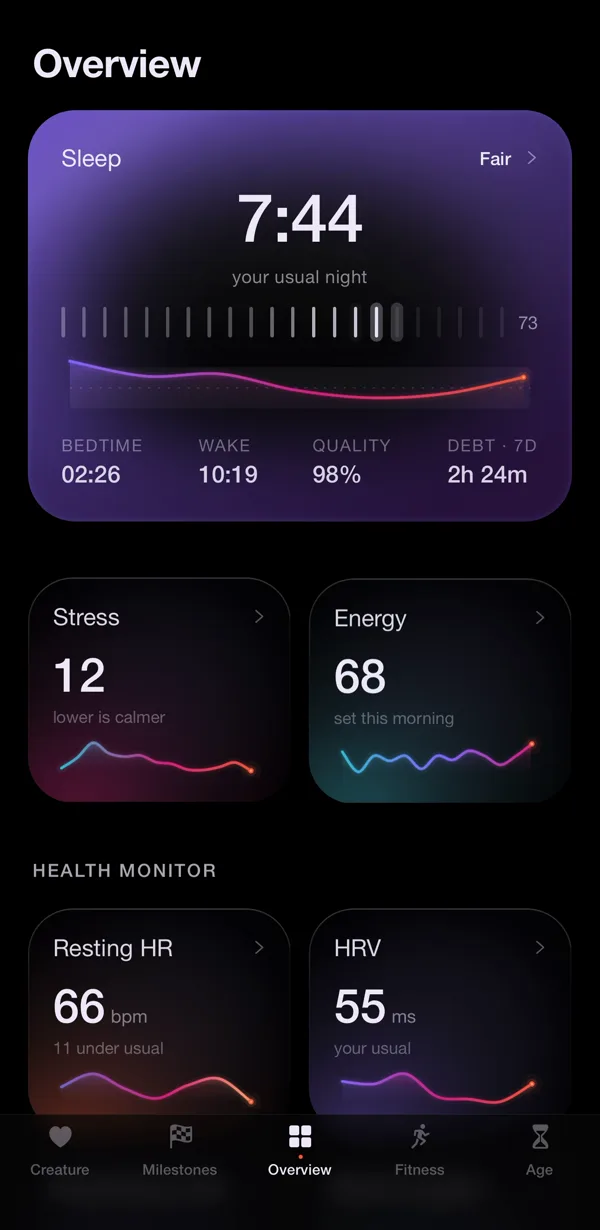
The difference from the apps above is what happens next. Nularo turns your nights into a creature whose mood (glowing, fine-but-judgy, wrecked or suspicious) is set against your own 14-day baseline, and it sends one morning verdict written from last night's real numbers. It judges. It does not coach, so you get the debt and an opinion about it, not a plan for paying it back. If you want a friend to see that you had a rough week without seeing your actual sleep numbers, its friend mode shares only a mood word and a good-day count; there is more on that in sleep tracking with a partner or friends, and on the creature itself in virtual pet apps that use Apple Health.
The honest limitation: it is iPhone only and it works from what Apple Health already has, so without a watch on at night the sleep data, and the debt, gets thin. It also updates the morning after, not in real time. It is a subscription, $39.99 a year with a 3-day free trial, or $9.99 a month.
Sources
- Apple Support: View your sleep history in Health on iPhone
- Apple Support: View your sleep score on Apple Watch
- Apple Support: Edit sleep schedules in Health on iPhone
- Van Dongen et al., "The cumulative cost of additional wakefulness", Sleep (2003)
- CDC: About Sleep (recommended hours by age)
Try Nularo
Frequently asked questions
Does Apple Watch calculate sleep debt?
No. Apple Watch records Time Asleep, sleep stages and a nightly Sleep Score, but neither the watch nor the Health app adds up nightly shortfalls into a sleep debt figure. You can work it out from the Sleep chart, or use an app that reads Apple Health.
Is the Apple Watch Sleep Score the same as sleep debt?
No. Sleep Score rates one night out of 100, from duration (50 points), bedtime consistency (30 points) and interruptions (20 points). It does not carry a shortfall from earlier nights forward. Sleep debt is a running total across several nights.
What sleep need should I use to calculate sleep debt?
Most apps use either the Sleep Goal you set in Health or a recommendation by age group. The CDC lists 7 or more hours for adults aged 18 to 60. The number is a reference point, not a diagnosis, and if you are worried about your sleep, talk to a doctor.
Why does my sleep debt differ between apps?
Each app picks its own window and its own target. Rise rolls the gap over 14 nights and weights recent nights more. Sleep Ledger uses a 14-day rolling window. Nularo shows a 7-day figure. Different windows give different totals from the same Apple Health data.
Does Nularo show sleep debt?
Yes. Nularo reads your sleep from Apple Health and shows a 7-day sleep debt on its Overview tab, with nothing to log. It is iPhone only and updates the morning after, and the creature judges the number rather than telling you what to do about it.
Nularo is an entertainment and wellness app, not a medical device. Nothing on this page is medical advice. If something about your sleep or heart worries you, talk to a doctor.