How to track sleep with a partner or friends on iPhone
Updated October 19, 2026 · 6 min read · How we write these
 Nularo reads your Apple Health and turns it into a creature that reacts to how you really slept and moved.
Get it
Nularo reads your Apple Health and turns it into a creature that reacts to how you really slept and moved.
Get it
Short answer
Built in: open the Health app, tap Sharing, then Share with Someone, pick a contact and choose the topics to share. Sleep is one of the topics, and the other person sees your data in their own Health app. Apple Fitness sharing (Fitness app > Sharing) shows Activity rings, workouts and 7-day competitions, not sleep. For something lighter, Oura Circles shares scores, Pokémon Sleep shares sleep length and type, and Nularo's friend mode shares only a mood word and a good-day count.
You both wear an Apple Watch. You both say you will be in bed by eleven. One of you is lying. You want a way to see who actually slept, without handing over your entire Health app to settle it.
What your iPhone already shares: Health Sharing
The Health app has a Sharing tab, and it is the only built-in way to show another person your sleep. It works between two iPhones, and you pick exactly which topics go across.
- Save the other person in your Contacts. Sharing will not find them otherwise.
- Open the Health app and tap Sharing.
- Tap Share with Someone. If you already share with one person, tap Add another person, then Next.
- Search for the contact and tap them.
- Tap See Suggested Topics or Set Up Manually, turn on what you want to share, then tap Share and Done.
Sleep is one of the topics, next to activity, heart and mobility data. You get a notification when they accept. They see your shared data in their own Health app, with trends highlighted, and they can tap Message to send you a chart.
A few details Apple documents that matter for couples and friends:
- It is one direction. Sharing yours does not give you theirs. They set it up on their phone, or you tap Sharing > Ask Someone to Share. That needs iOS 15.6 or later on their iPhone.
- Both people need iCloud with two-factor authentication. Apple's health privacy overview says the shared data stays end-to-end encrypted, and you can share with up to five people.
- Notifications can come along. People you share with can also see some health notifications you receive, such as high heart rate alerts, if you include them.
- You can pull it back. Health > Sharing > tap the name > View Shared Data to change topics, or Stop Sharing to end it. Deleting them from Contacts does not stop sharing.
If what you really want is a shared word for "running on empty", our guide to whether Apple Watch tracks sleep debt covers what the Health app does and does not calculate.
What Apple Fitness sharing covers (and what it skips)
Activity sharing is the feature most people think of first, and it is genuinely good for friendly pressure. It just does not touch sleep.
To start it, open the Fitness app on your iPhone, tap Sharing, then Invite a Friend (or Get Started the first time). On Apple Watch, open the Activity app and tap Invite a Friend. Friends see your Activity rings for the last 7 days, workouts you finished and goals you met.
Competitions are the fun part. You earn a point for every percent of your rings you close each day, up to 600 points a day, for 7 days, so 4,200 is the maximum. Your watch tells you when you pull ahead or fall behind. To start one: Fitness > Sharing > tap a friend > Compete.
The score is rings only: move, exercise and stand. There is no sleep competition, no shared bedtime and no way to add sleep to what friends see. If you want sleep in the mix, it has to come from Health Sharing or from a third-party app.
Apps built for sleeping "together"
These are the options we could confirm on official pages or App Store listings in October 2026. They solve different problems, so the right one depends on what you want the other person to see.
- Oura Circles. Shares your Readiness, Sleep and Activity scores, as daily scores or weekly averages, shown as color-coded bars. You can be in up to 10 circles of up to 20 people. Everyone needs an Oura ring and an active Oura membership, so it only works if your whole group owns one.
- Pokémon Sleep. Free to play with in-app purchases. Adding a friend shares your sleep duration, your sleep type and the number of sleep styles you have studied, and the game rewards you for checking their research. It can track with the phone by your pillow or read sleep from Apple Health if you wear a smartwatch. We compare it with other gamified sleep tracker apps separately.
- Sleep Cycle partner linking. This is for two people in one bed, not for sharing results. When both of you are premium users on iPhone and on the same Wi-Fi, the two phones link so the app can tell your movement from your partner's. Sleep Cycle's help pages put it at Profile > More > Partner Linking.
- Pengu (Friends: Pengu, Bao & Mellow). The best-known virtual pet app for couples. Two people raise one pet together through chats, choices, gifts and reactions. It is free to download with a paid Pengu Pass. It does not use health data, so it is a shared pet, not a sleep tracker.
- Finch. A self-care pet you can add friends to with a friend code, then send each other encouragement. It runs on goals you tick off, not on Apple Health sleep. If you want something in that space for grown-ups, see our Finch alternatives for adults.
The pattern: pet apps for couples are social but ignore your data, and tracker apps are accurate but share scores or nothing. Our list of virtual pet apps that use Apple Health covers the apps that sit in between.
Raw numbers or a summary: decide this first
Before you pick a tool, decide how much you actually want the other person to know. There are roughly three levels.
Raw data. Health Sharing sends the real numbers in the topics you pick: times, durations, charts, trends. That suits a partner or family member who wants the detail. It also means they can see the night you went to bed at 3:40, and the heart data next to it if you turned that topic on.
Scores. Oura Circles and Pokémon Sleep share a processed layer: a score, a sleep length, a type. Less detail, still a number someone can compare against theirs.
A verdict only. The friend knows whether you had a good day or a bad one, and nothing about why. This is the level most accountability buddies need. A friend who sees "wrecked" will ask. A friend who sees "5h 12m, resting heart rate 71" might start interpreting.
There is no wrong answer. Just check the topic list before you tap Share, because the Set Up Manually screen is long, and it is easy to send more than you meant to.
Where Nularo fits
Nularo is an iPhone app with a creature that reads your Apple Health data every night (sleep, steps, active minutes, resting heart rate, HRV and more) and gives you a morning verdict. Its friend mode was built for the third level above.
You invite someone with a 6-character code. Each of you has your own creature, and they sit side by side with a tally for this week. Your friend sees your display name, today's mood word and your good-day count. That is all. They never see your sleep, steps or heart numbers, and they never see the roast your creature wrote about your night.
The mood word is one of four (glowing, fine-but-judgy, wrecked, suspicious), and each creature judges its owner against their own 14-day baseline. A partner who sleeps six hours and one who sleeps eight are each measured against themselves, not against each other. The same goes for a partner on nights; there is more on making Apple Watch record day sleep in sleep apps for night shift workers. The creature also never gives advice. It judges, it does not coach, so neither of you gets lectured.
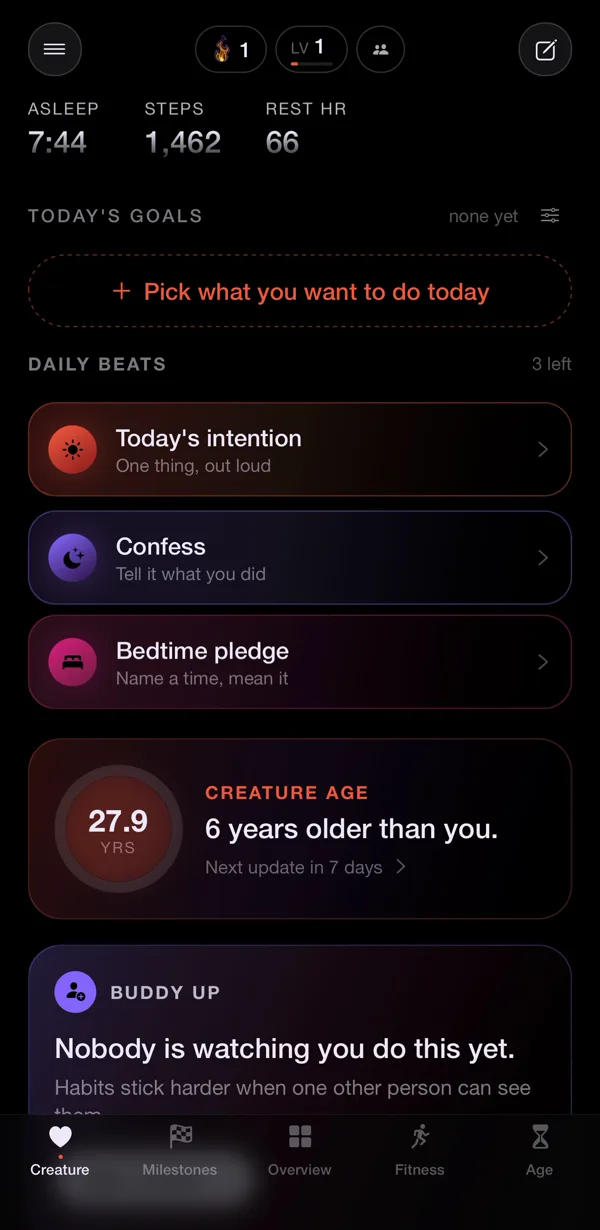
The Buddy Up card on the Today screen is where it starts: "Nobody is watching you do this yet."
One honest limitation: Nularo is iPhone only, and your friend needs it on their own iPhone too. It also works from what Apple Health recorded, so without an Apple Watch the sleep data is thinner, and the verdict lands the morning after, not in real time. Nularo is $39.99 a year with a 3-day free trial, or $9.99 a month.
Sources
- Apple: Share your data in Health on iPhone and View data shared by others
- Apple: Share your activity in Fitness on iPhone and Share your activity from Apple Watch
- Apple: Health Privacy Overview (PDF)
Try Nularo
Frequently asked questions
Can my partner see my Apple Watch sleep data?
Only if you share it. In the Health app, tap Sharing, then Share with Someone, and pick the topics you want them to see. They view it in their own Health app, and you can change or stop it at any time from the same tab.
Can I compete with friends on sleep using Apple Watch?
Not with Apple's own tools. Activity competitions in the Fitness app score how much of your Activity Rings you close over 7 days. Sleep is not part of the score. For sleep with friends you need a third-party app.
Does Health Sharing let the other person edit or keep my data?
They can view what you share, get the notifications you chose, and message you about a chart. Apple says that if you stop sharing entirely, your Health data is removed from their device.
Is there a virtual pet app for couples that uses real health data?
Most couple pet apps, like Pengu, run on chats, taps and gifts, not health data. Nularo is different: each person's creature reacts to their own Apple Health sleep and movement, and in friend mode the two creatures sit side by side while sharing only a mood word and a good-day count.
Nularo is an entertainment and wellness app, not a medical device. Nothing on this page is medical advice. If something about your sleep or heart worries you, talk to a doctor.