How to see Apple Health Age (and why it is not there yet)
Updated October 28, 2026 · 6 min read · How we write these
 Nularo reads your Apple Health and turns it into a creature that reacts to how you really slept and moved.
Get it
Nularo reads your Apple Health and turns it into a creature that reacts to how you really slept and moved.
Get it
Short answer
You cannot see Apple Health Age on a public iOS release yet. Apple announced it in September 2026 for a new Longevity tab in a redesigned Health app, but pulled that app from iOS 27.2 beta 4 and shipped iOS 27.2 on October 26 without it. When it arrives you will need an Apple Intelligence iPhone (iPhone 15 Pro or later), the iPhone set to U.S. English, and an Apple Watch. Until then, the closest built-in number is Cardio Fitness: Health > Browse > Heart > Cardio Fitness.
You updated to iOS 27.2, opened the Health app and went looking for the Longevity tab everyone posted about in September. You get Summary, Sharing and Browse, the same three tabs as last month, and no Health Age anywhere.
The short answer: you cannot see it yet
Health Age is real, announced and tested, but it is not on any public version of iOS. Here is how it got there:
- September 9, 2026. Apple announced a redesigned Health app with two new tabs: Insights, for timely health information, and Longevity, which looks at your long-term data. Health Age lives in Longevity. Apple said the new app would arrive "later this year," starting in U.S. English.
- September 16 and 22. The redesign appeared in the first iOS 27.2 developer beta, then the first public beta.
- October 13. iOS 27.2 beta 4 removed it and put the old Health app back, with the familiar Sharing tab where Longevity had been. According to 9to5Mac's report on the beta notes, Health data added during testing was kept.
- October 26. Apple released iOS 27.2 to everyone, without the redesigned Health app.
So if you are on iOS 27.2, nothing is wrong with your phone. Restarting it, signing out of iCloud or deleting and reinstalling Health will not make Health Age appear, because the code is not in this release. Apple has not said which update will carry it. Some coverage expects it in iOS 27.3, but that is a guess, not an announcement.
One more trap: the App Store has apps with "Health Age" or "Bio Age" in their names. None of them are Apple's feature. They are third-party apps that read Apple Health, compared in our guide to biological age apps for Apple Watch.
What you will need when it does arrive
The redesigned Health app is built on Apple Intelligence, so the requirements are stricter than for the Health app you have now. Check these today and you will know whether to expect it at all.
- An Apple Intelligence iPhone. That means iPhone 15 Pro, iPhone 15 Pro Max, or any iPhone 16 or later. Older iPhones keep the current Health app.
- U.S. English. Apple says the app starts in U.S. English, with more languages later. Check Settings, then General, then Language & Region.
- An Apple Watch. Apple lists Health Age as requiring one. Without a watch, there is no VO2 max estimate from your wrist and far less sleep and heart data to compare.
- The update itself. Settings, then General, then Software Update. Your current version is shown in Settings, then General, then About.
Once it ships, the path should be simple: open Health and tap the Longevity tab. That is where Apple and every beta hands-on placed it. If the menus change at release, we will update this page.
What Health Age will actually show
Apple describes Health Age as using Apple Watch data to show how your metrics are tracking relative to your chronological age. The inputs Apple named are VO2 max, resting heart rate, sleep and heart rate variability (HRV). You can also add lab results, such as A1c and LDL cholesterol.
That makes it the same kind of number as Whoop Age or Bevel's Biological Age: an estimate built from fitness and habit metrics, expressed in years. It is not a DNA methylation test and it is not a diagnosis. Apple has not published the formula, so nobody outside Apple can tell you yet how much each input weighs.
Two things are worth knowing in advance. Your chronological age, the number Health Age is compared against, comes from your birth date in Health Details: tap your profile picture or initials in Health, tap Health Details, then Edit. If that is wrong, every age comparison is wrong. And HRV is the noisiest of the four inputs, for reasons covered in why Apple Watch HRV is always low. If Health Age ever tells you something that worries you, take it to a doctor, not to the App Store.
What you can check in Health today
Everything Health Age is built from is already on your iPhone. You just have to look at it one metric at a time.
- Cardio Fitness. Health, Browse, Heart, Cardio Fitness, then Show All Cardio Fitness Levels. This is the closest thing to an age comparison Apple offers now: it shows where your VO2 max sits in the ranges for your age and sex. Apple says it needs Apple Watch Series 3 or later and is estimated during outdoor walks, runs and hikes, so indoor workouts do not count. To turn that VO2 max into years, see how to read your fitness age on Apple Watch.
- Resting heart rate and HRV. Health, Browse, Heart, then Resting Heart Rate or Heart Rate Variability. Look at the monthly or six-month view; single days bounce around.
- Sleep. Health, Browse, Sleep. If you want to know what your watch says about running short over several nights, see whether Apple Watch tracks sleep debt.
- Vitals on Apple Watch. The Vitals app builds your typical overnight range for heart rate, respiratory rate, blood oxygen, wrist temperature and sleep duration (HRV on newer models) after 7 nights of sleep tracking, and flags nights when two or more are outside it.
None of these gives you a single age. They do tell you which direction each input is heading, which is most of what Health Age will summarize.
If you want an age number now: Nularo's Creature Age
Nularo is an iPhone app with a creature that lives on your Apple Health data, and its Age tab shows a Creature Age. It is recalculated every week from six inputs: sleep duration (anchored at 7h30 a night), bedtime consistency, steps (8,000 a day), active minutes (30 a day), resting heart rate and HRV. It reads all of that from Apple Health, read-only, so there is nothing to log.
The part Health Age has not shown yet is a breakdown. The Age tab lists which habit added years this week, so a bad week reads as "your bedtime drifted" rather than a mystery number. A good stretch can make the creature up to 1.5 years younger than you. It stays hidden until 7 days of data exist. Bedtime consistency is one input Apple has not named for Health Age; our guide to sleep consistency apps explains how different apps measure it.
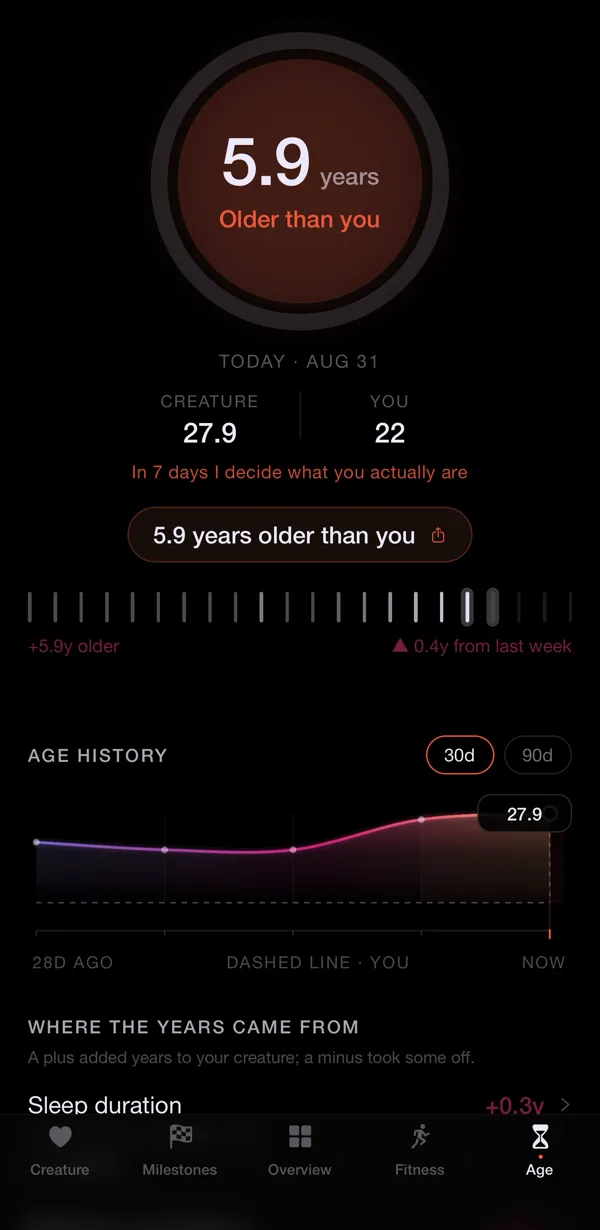
To be plain: Creature Age is a rules-based, for-fun number built from public-health guidelines. It is not Apple's Health Age, not a biological age test and not medical. The honest limitations: it is iPhone only, without an Apple Watch the data behind it gets thin, it reflects last week rather than today, and it judges you rather than coaching you. It is a subscription, $39.99 a year with a 3-day free trial or $9.99 a month. If you would rather your health data fed a pet than a number, see our list of virtual pet apps that use Apple Health.
Sources
- Apple Newsroom: Apple advances health and fitness capabilities using Apple Intelligence (September 2026)
- Apple Support: Track your cardio fitness levels
- Apple Support: Track your overnight and daytime vitals with Apple Watch
- 9to5Mac: iOS 27.2 beta 4 no longer includes Apple's overhauled Health app
Try Nularo
Frequently asked questions
Is Apple Health Age out yet?
No. As of October 28, 2026 it is not in any public iOS release. It appeared in early iOS 27.2 betas inside a redesigned Health app, Apple removed that app in iOS 27.2 beta 4 on October 13, and iOS 27.2 shipped on October 26 without it. Apple still says the new Health app is coming later this year.
Why can't I see Health Age after updating to iOS 27.2?
Because it is not in iOS 27.2. Updating, restarting or reinstalling the Health app will not make it appear. It arrives with the redesigned Health app in a future update.
Does Apple Health Age work without an Apple Watch?
No. Apple says Health Age requires an Apple Watch. It is built from watch measurements such as VO2 max, resting heart rate, sleep and heart rate variability.
How do I change the age the Health app uses?
Your chronological age comes from your birth date in Health Details. In the Health app, tap your profile picture or initials, tap Health Details, tap Edit, change Birth Date, then tap Done. Cardio Fitness ranges use it too.
Is Nularo's Creature Age the same as Apple Health Age?
No. Creature Age is Nularo's own rules-based, for-fun number, built from public-health guidelines on sleep and movement plus your resting heart rate and HRV trends from Apple Health. It is not Apple's feature and it is not medical. It is available now, on a subscription.
Nularo is an entertainment and wellness app, not a medical device. Nothing on this page is medical advice. If something about your sleep or heart worries you, talk to a doctor.