Apple Watch sleep graph explained: stages, gaps and views
Updated November 1, 2026 · 7 min read · How we write these
 Nularo reads your Apple Health and turns it into a creature that reacts to how you really slept and moved.
Get it
Nularo reads your Apple Health and turns it into a creature that reacts to how you really slept and moved.
Get it
Short answer
Open Health, tap Browse, Sleep, then Sleep again. The D tab shows last night as a timeline of four stages your watch estimates every 30 seconds from wrist motion: Awake, REM, Core (Apple's name for light stages N1 and N2) and Deep (N3). Stepping up and down through the night is normal: sleep runs in cycles of roughly 90 to 110 minutes, with more deep sleep early and longer REM late. Trust the total and timing more than the exact stage split.
You open the Health app the morning after a rough night and find a strip of colored blocks that climbs, drops, and blinks awake at 3:12 a.m. You know it is your sleep. You just do not know whether it is saying anything. Here is how to read it, and which parts deserve your attention.
Where the sleep graph lives
On iPhone, open the Health app, tap Browse, tap Sleep, then tap Sleep again. The graph at the top has four tabs:
- D shows one night as a timeline. This is the graph most people mean: each stage gets its own band, and the blocks move between them as the night goes on.
- W and M show one column per night, so you can compare a week or a month at a glance.
- 6M shows the long view, useful for seeing whether a bad patch was a week or a season.
Swipe the graph left or right to move back in time. Tap a column to see that night's details. Under the graph you can switch between three views:
- Stages: the time and percentage you spent Awake, in REM, Core and Deep.
- Amounts: Time Asleep set against your Sleep Goal.
- Comparisons: your heart rate and respiratory rate plotted against your time asleep. On Apple Watch Series 8 or later and any Apple Watch Ultra, nightly wrist temperature changes can appear here too.
Further down, Show More Sleep Data opens the other sleep categories, and Show All Data lists every individual entry with the device or app that wrote it. That last one matters more than it sounds; more on it below.
On the watch itself, the Sleep app shows your recent nights, sleep stages and Time Asleep, plus your Sleep Score on watchOS 26 and later. It is the quick glance. The iPhone graph is where you can actually read the night.
What each stage on the graph means
Your watch does not measure brain waves. Apple's white paper on sleep staging explains that the watch looks at accelerometer data from your wrist and labels every 30-second slice of the night as one of four stages. The labels map onto the stages a sleep lab uses:
- Awake. Time awake between two stretches of sleep. Apple's developer documentation says the watch only records Awake entries that fall between sleep entries, so lying awake before you drift off, or scrolling after the alarm, is not drawn. Apple says its 2025 update (iOS 26 and watchOS 26) got better at spotting "quiet wake", when you are awake but lying very still.
- REM. The stage most associated with dreaming. Lab staging calls it REM too.
- Core. Apple's name for lab stages N1 and N2, what other trackers call light sleep. Apple says it avoided the word "light" on purpose, because N2 is the main stage of the night and often makes up more than half of it. So if Core is your biggest band, that is the expected result, not a flaw.
- Deep. Lab stage N3, also called slow-wave sleep.
Apple's white paper also says these stage estimates are not meant for clinical use. Treat the graph as a good diary of your night, not a sleep study.
Why the graph steps up and down
A night that zigzags between bands is the normal shape. Sleep runs in cycles. The StatPearls reference on sleep physiology (published through the US National Library of Medicine) describes adult sleep alternating between non-REM and REM roughly every 90 to 110 minutes, four to six times a night. That is why the D graph looks like a staircase going up and down several times instead of a flat line.
The cycles are not identical, and the graph shows that too:
- Deep sleep bunches up early. Non-REM sleep dominates the first half of the night, so most of your Deep blocks should sit in the first few hours.
- REM gets longer late. Early REM periods can last only a few minutes. Later ones can run past 30 minutes, so the long REM blocks tend to sit near morning.
- The overall split. In healthy adults, non-REM takes up about 75 to 80 percent of sleep and REM about 20 to 25 percent, according to the same reference.
So a graph with Deep in the first half, longer REM toward the end and a thick Core band throughout is a graph working as designed. Short Awake blinks between cycles show up on plenty of ordinary nights. If what you see worries you (long stretches awake every night, or a pattern that changed and stayed changed), that is a conversation for a doctor, not for a graph.
How much to trust each part
Some parts of the graph are far more reliable than others, and knowing which saves a lot of worrying about 11 minutes of Deep.
Total sleep and timing: strong. In Apple's own validation, the watch classified the vast majority of true sleep as sleep, with a median sleep sensitivity of 97.9 percent. Independent testing agrees. A 2024 study in the journal Sensors put 35 healthy adults in a sleep lab wearing an Apple Watch Series 8, an Oura Ring and a Fitbit, and found all three were similar to lab measurement for sleep duration.
Awake: weaker. Apple's median wake specificity was 75.0 percent, meaning about a quarter of true awake time got called sleep. In the Sensors study, the watch under-counted wake by about 7 minutes.
Deep versus Core: weakest. Apple says its most common staging error was true Deep sleep being labeled Core. The Sensors study saw the same thing in minutes: the Series 8 under-counted deep sleep by about 43 minutes and over-counted light sleep by about 45. Treat the Deep and Core bands as rough, and the line between them as blurry.
Two practical points follow. First, compare your graph against your own past weeks, not against a friend's watch or a number from the internet. Second, a loose band can add movement that the watch reads as restlessness, so wear it snug enough to stay in place overnight.
Reading the week view, the gaps and the strange nights
The W and M views are where the graph earns its keep. One bad night is noise. Three short nights in a row is a pattern, and the week view shows it before you feel it. Apple does not add those shortfalls up for you; our guide on working out your sleep debt from the Health app shows the two-minute sum. If your columns start at very different times from night to night, the graph is showing you consistency, which is a third of the Sleep Score; sleep consistency apps explains how different apps measure it.
The odd things people ask about most:
- A gap in the night. Usually the watch came off, died or went on the charger. Nothing is drawn for time the watch was not on your wrist.
- No Time in Bed any more. Apple stopped recording it on watchOS 11 and iOS 18. Our guide to why Apple Watch time in bed is missing covers what changed.
- Numbers that do not add up. Two apps writing sleep for the same night. Tap Show All Data to see who wrote what, and Data Sources & Access to choose which source wins.
- Daytime sleep in the wrong place. If you sleep after night shifts, see sleep apps for night shift workers.
The Comparisons view adds context rather than verdicts. Heart rate and respiratory rate plotted over your sleep show how the night went for your body, not just your stages. If the overnight numbers you care about are HRV, our guide on Apple Watch HRV readings explains how those samples are taken. And if you want one number instead of a graph, apps that rate your sleep compares Apple's Sleep Score with the others.
Where Nularo fits
Full disclosure: Nularo is our app. It does not redraw the stage graph, and the Health app is still the best place to read a night minute by minute. What Nularo does is the step after the graph. It reads your sleep and sleep stages from Apple Health, read-only, along with steps, active minutes, workouts, resting heart rate, HRV, respiratory rate and SpO2, and you log nothing.
Each morning it sends a verdict notification written from last night's numbers, and it shows Sleep, Stress and Energy scores plus a 7-day sleep debt. A creature reacts with one of four moods (glowing, fine-but-judgy, wrecked or suspicious), set against your own 14-day baseline. That is the same rule this guide ends on: compare yourself with yourself.
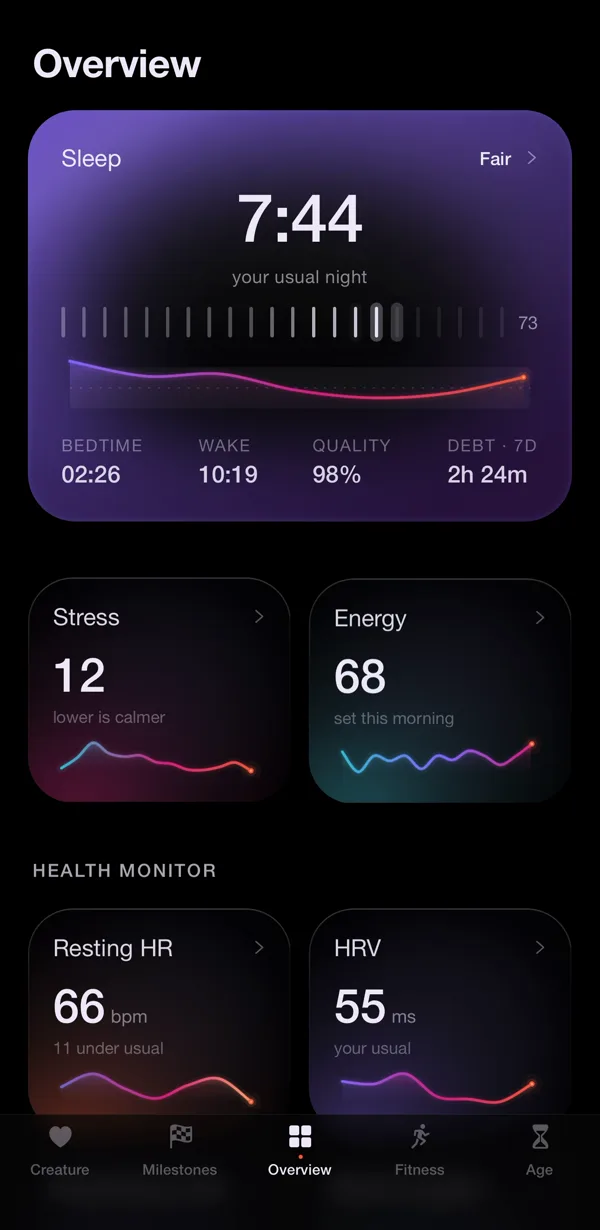
The honest limitation: Nularo sees exactly what Apple Health sees. If the watch was on the charger, the creature gets the same thin night the graph shows. It is iPhone only, it reports the morning after rather than in real time, and it judges rather than coaches. It is a subscription: $39.99 a year with a 3-day free trial, or $9.99 a month.
Sources
- Apple Support: View your sleep history in Health on iPhone
- Apple Support: Track your sleep on Apple Watch and use Sleep on iPhone
- Apple: Estimating Sleep Stages from Apple Watch (updated October 2025)
- Robbins et al., "Accuracy of Three Commercial Wearable Devices for Sleep Tracking in Healthy Adults", Sensors (2024)
- StatPearls: Physiology of Sleep (NCBI Bookshelf)
Try Nularo
Frequently asked questions
What do the colors on the Apple Watch sleep graph mean?
Each color is one of the four stages your watch estimates: Awake, REM, Core and Deep. Core is Apple's name for the light stages N1 and N2, and Deep is stage N3. The legend sits next to the stage totals under the graph, so you can match a color to a stage on your own iPhone.
Why does my Apple Watch show so much core sleep?
Because Core covers N1 and N2 together, and Apple notes that N2 alone often makes up more than half of a night. Independent testing also found the watch tends to file some deep sleep under Core. A Core-heavy graph is what most people see.
How much deep sleep should Apple Watch show?
Apple does not set a target for any stage. Reference texts put REM at about 20 to 25 percent of a healthy adult's night, with deep sleep concentrated in the first half, and a 2024 study found the Series 8 under-counted deep sleep by about 43 minutes a night. Compare your graph with your own past weeks, and talk to a doctor if your sleep worries you.
Why is there a gap in my sleep graph?
A gap usually means the watch was off your wrist, ran out of battery, or was charging. The watch only records Awake between two stretches of sleep, so time awake before you dropped off is not drawn either. Check Show All Data to see what was recorded.
Does Nularo show the sleep graph?
Nularo reads your sleep and sleep stages from Apple Health, read-only, and turns them into a morning verdict, a Sleep Score and a 7-day sleep debt. It does not replace the Health app's stage graph, which is still the place to see the night minute by minute.
Nularo is an entertainment and wellness app, not a medical device. Nothing on this page is medical advice. If something about your sleep or heart worries you, talk to a doctor.