Apple Watch time in bed: why it is missing or shorter than sleep
Updated October 31, 2026 · 7 min read · How we write these
 Nularo reads your Apple Health and turns it into a creature that reacts to how you really slept and moved.
Get it
Nularo reads your Apple Health and turns it into a creature that reacts to how you really slept and moved.
Get it
Short answer
Apple stopped recording In Bed data on watchOS 11 and iOS 18; an Apple engineer said the samples were not as accurate as Apple wanted, and there is no replacement. So new nights show Time Asleep and stages only. When Time in Bed is shorter than Time Asleep, the two numbers came from different sources (an older iPhone estimate or a third-party app, versus your watch). Open Health, tap Browse, Sleep, then Data Sources & Access to see who wrote what.
You open the Health app to check last night and something looks wrong. Either Time in Bed has vanished completely, or an older night claims you were in bed for 6 hours 50 minutes and asleep for 7 hours 20. You did not sleep on the floor. Here is what changed, and how to read the numbers you have now.
Apple stopped recording time in bed
If Time in Bed disappeared from your recent nights, nothing is broken. Apple removed it on purpose. On Apple's own developer forums, a developer asked why Apple Watch stopped writing In Bed samples to Health in iOS 18. An engineer from Apple's Worldwide Developer Relations replied that Apple "stopped recording the inBed samples on watchOS 11 and iOS 18 because the samples are not quite as accurate as what we'd like them to be," and that the system "doesn't provide a replacement."
The iPhone lost it too. Up to iOS 17, the Health app had a Track Time in Bed with iPhone switch at the bottom of Full Schedule & Options, which let the phone estimate when you were lying in bed from your sleep schedule and how you used the phone. That switch is gone from iOS 18 onward, so a phone on its own no longer records anything overnight.
What you get today, on iOS 27 and watchOS 27, is the asleep side of the night:
- Time Asleep and the time and percentage in Awake, REM, Core and Deep, in the Health app under Browse, Sleep, Sleep. If the stage timeline itself is the puzzle, see how to read the Apple Watch sleep graph.
- Sleep Score, out of 100: duration (50 points), bedtime consistency (30) and interruptions (20). It needs a recent Apple Watch on watchOS 26 or later. Our guide to apps that rate your sleep compares it with other scores.
So a Health app that shows only asleep data is working as designed. Nights from before the update keep whatever In Bed data they already had, which is exactly where the strange numbers come from.
Why time in bed can be less than time asleep
Logically it should be impossible. In practice it happens because Time in Bed and Time Asleep were rarely measured by the same thing. Health stores each one as separate entries, each tagged with the app or device that wrote it, and it does not trim one to fit inside the other. Three situations cause almost all of it.
1. Phone in bed, watch asleep. On iOS 17 and earlier, a common setup was the iPhone writing In Bed and the watch writing the sleep stages. They used different signals. The phone's estimate leaned on your sleep schedule and on whether you were using the phone; the watch used motion and heart data from your wrist. If you fell asleep before the phone decided you were in bed, or the phone decided you were up while the watch still had you asleep, the asleep stretch spills outside the in-bed one. Add those minutes together and Time Asleep wins.
2. A third-party app writing its own window. Some sleep apps write their own In Bed entry, based on their own detection or on when you started and stopped a session. Your watch keeps writing the stages. Two apps, two ideas of when the night began. Since watchOS 11, this is the most likely cause on a recent night: if you see any In Bed data at all on a new night, an app other than Apple's wrote it.
3. Asleep data counted from two sources. If your watch and an app both write asleep entries for the same night, the total can swell. Apple says that when several sources contribute the same type of data, the one at the top of the list takes priority, but overlapping data still trips people up. AutoSleep's own release notes, for example, mention a change to how it records sleep stages in Apple Health for users who were seeing extra asleep data in their graphs.
One more detail from Apple's HealthKit documentation: Apple Watch only records Awake entries that fall between two sleep entries. Lying awake before you nod off, or scrolling in bed after the alarm, was never counted as Awake by the watch. That was the gap Time in Bed used to fill.
How to check where your sleep numbers came from
This takes two minutes and tells you which of the three cases you have.
- Open the Health app, tap Browse (Search on some versions), tap Sleep, then tap Sleep again.
- Scroll to the bottom and tap Show All Data. Each entry is labeled In Bed, Awake, REM, Core or Deep, with the source that wrote it. Tap one to see its exact start and end times.
- Go back and tap Data Sources & Access. This lists every app and device that contributes sleep data.
- To make your watch win when sources overlap, tap Edit, touch and hold the handle next to Apple Watch, drag it to the top, then tap Done. Apple's default order puts manually entered data first, then your iPhone, iPad and Apple Watch, then other apps, and a newly added source lands above other apps and devices.
- If an app is writing sleep you do not want, tap it in that list and turn off its permission to write Sleep. You can also delete individual entries from Show All Data by swiping left on them.
If In Bed comes from your iPhone and the stages from your watch, it is case 1 and it only affects nights from before the update. If In Bed comes from an app, you have case 2, and that app's window is the one to question. If you see asleep entries from two sources overlapping, it is case 3, and the source order or the app's write permission is the fix.
What to watch instead of time in bed
Most people looked at Time in Bed for one of two reasons: to see how long it took to fall asleep, or to see how much of the night was spent awake. Apple's own data still covers some of that, just differently.
- Awake inside the night. The Awake stage in Health still shows time awake between two stretches of sleep. The Sleep Score's 20 interruption points are built from the same idea.
- When you fell asleep. The Sleep Score's bedtime consistency points look at when you fell asleep over the last 13 nights. Our guide to sleep consistency apps explains how other apps define consistency, and which ones depend on In Bed data.
- The running total. Nightly Time Asleep is what feeds sleep debt, which Apple does not add up for you. It works the same with or without In Bed data.
Apps that depend on In Bed data now have a gap. Athlytic's help docs say its sleep consistency and sleep latency figures need In Bed samples, so they can come up empty on watch-only nights. AutoSleep says it can still estimate time in bed even when you charge the watch overnight, by noticing when you take it off at bedtime and put it back on in the morning, and it writes its sleep data to Apple Health. If you add an app like that, check Show All Data afterwards so you know which window you are looking at.
If you sleep in the daytime after shifts, the watch can only label that sleep against a schedule you have set; see sleep apps for night shift workers. And if you keep seeing long stretches awake that worry you, that is a question for a doctor, not for a data source list.
Where Nularo fits
Full disclosure: Nularo is our app. It does not bring Time in Bed back, and it does not need it. It reads your sleep and sleep stages from Apple Health, read-only, along with steps, active minutes, workouts, resting heart rate, HRV, respiratory rate and SpO2, so it works from the asleep data your watch still records. You log nothing.
Each morning it sends a verdict notification written from last night's numbers, and its Overview tab shows a 7-day sleep debt. A creature reacts with one of four moods (glowing, fine-but-judgy, wrecked or suspicious), set against your own 14-day baseline rather than a fixed ideal.
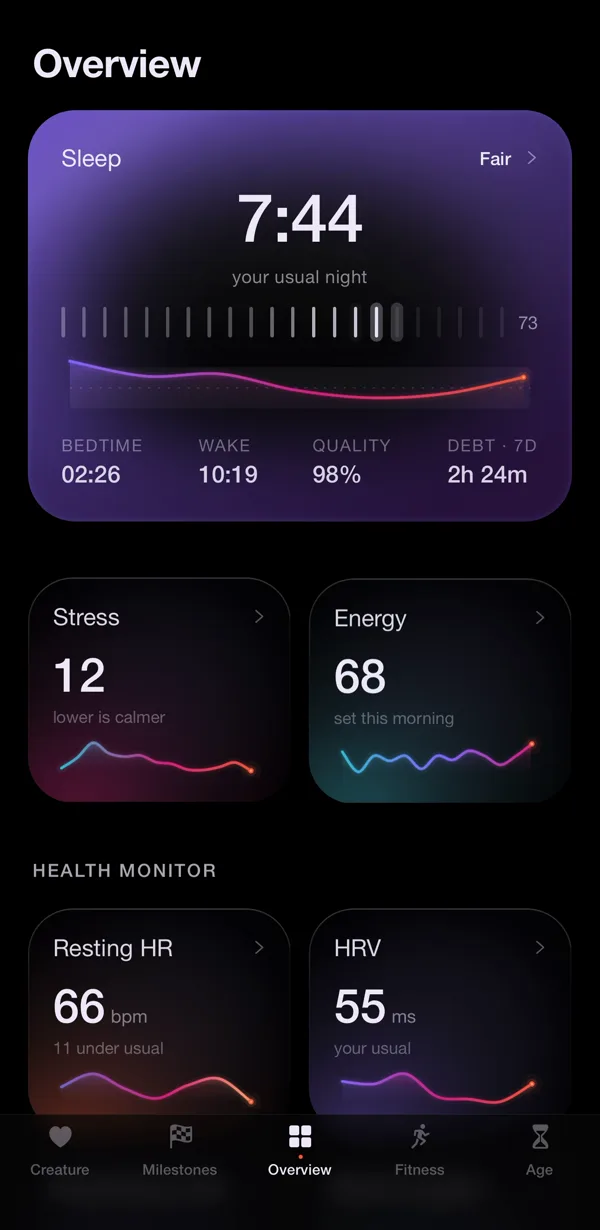
The honest limitation: Nularo can only judge what Apple Health has. If your watch was on the charger, or a duplicate app has muddied the night, the creature sees the same muddy night you do, so it is worth tidying your data sources first. It is iPhone only, it reports the morning after rather than in real time, and it judges rather than coaches. It is a subscription: $39.99 a year with a 3-day free trial, or $9.99 a month.
Sources
- Apple Developer Forums: Sleep Analysis inBed sample not recorded on Apple Watch in iOS 18 (Apple DTS engineer reply)
- Apple Support: Manage Health data on your iPhone, iPad, or Apple Watch
- Apple Support: View your sleep history in Health on iPhone
- Apple Developer: HKCategoryValueSleepAnalysis
Try Nularo
Frequently asked questions
Why does my Apple Watch no longer show time in bed?
Apple stopped recording In Bed samples on watchOS 11 and iOS 18. An Apple developer relations engineer said on Apple's developer forums that the samples were not as accurate as Apple wanted, and that there is no replacement. It is not a setting you switched off, and resetting the watch will not bring it back.
How can time in bed be less than time asleep?
Because the two numbers usually came from different places. Time in Bed was written by your iPhone (on iOS 17 and earlier) or by a third-party app, while Time Asleep came from your watch. Health does not force the two windows to line up, so an asleep stretch can start before the in-bed one.
Can I get time in bed back on iPhone?
Not from Apple. The Track Time in Bed with iPhone option that sat under Full Schedule & Options in iOS 17 is gone from iOS 18 onward. Some third-party apps estimate time in bed themselves and write it to Health, but check what any app writes before you trust the number.
Which apps break without time in bed data?
Anything that measures how long you took to fall asleep, or splits nights by when you got into bed. Athlytic's help docs, for example, say its sleep consistency and sleep latency figures need In Bed samples in Apple Health, so they can come up empty on watch-only data.
Does Nularo need time in bed data?
No. Nularo reads sleep and sleep stages from Apple Health, read-only, along with steps, heart data and more. It works from the asleep data your watch still records, and it reports the morning after rather than in real time.
Nularo is an entertainment and wellness app, not a medical device. Nothing on this page is medical advice. If something about your sleep or heart worries you, talk to a doctor.